
DAEMON iTools 1.0
DAEMON iTools lets you transfer media, books, photos from iOS device to PC
Program info
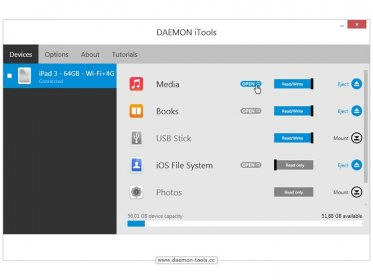
Discover your iOS device with DAEMON iTools which lets you upload and transfer Music, Videos, Books and iOS System Files just like you normally work with your USB stick.
Manage media on your iOS device simply
Add Music, Videos, Ringtones, Books & other files directly into your iOS device with smooth drag & drop feature or using Ctrl+C & Ctrl+V hotkeys. USB Plug-n-play makes it simple to discover iOS files and manage your data.
Upload music to iPhone, iPad or iPod Touch. No need to install iTunes
Once iOS device is connected, you can browse and transfer media files to iPhone, iPad or iPod Touch or back to PC. No need to launch or even install iTunes. Save the time you spent on synchronization before, enjoy custom ringtones and the easiest file tranfer.
Take use of Device-To-Device media transfer
DAEMON iTools enables you to copy any music, videos, photos, ringtones, books, PDFs & more between two iOS devices. Simultaneously. Just connect and drag files from one device and drop them to another device.
Use your iOS device as a USB stick
DAEMON iTools allows turning your iOS device into a handy USB stick. You can copy needed files at home and use them in the office. Forget about flash drives, because with DAEMON iTools your device can do more!
Details
Extensions

No information available
The data will be available later.Old versions

No information available
The data will be available later.Awards

There are no awards
Over time, app awards will appear here.


Comments